mirror of
https://github.com/CJackHwang/ds2api.git
synced 2026-05-06 09:25:27 +08:00

144 lines
3.9 KiB
Markdown
144 lines
3.9 KiB
Markdown
# DS2API
|
||
|
||
[](LICENSE)
|
||

|
||

|
||
|
||
将 DeepSeek 网页版转换为 OpenAI 兼容 API,支持多账号轮询、自动 Token 刷新、可视化管理界面。
|
||
|
||
## ✨ 特性
|
||
|
||
- 🚀 **OpenAI 兼容** - 完全兼容 OpenAI API 格式,无缝接入现有应用
|
||
- 🔄 **多账号轮询** - Round-Robin 负载均衡,支持高并发
|
||
- 🔐 **Token 自动刷新** - 过期自动重新登录,无需手动维护
|
||
- 🌐 **WebUI 管理** - 可视化添加账号、测试 API、同步 Vercel
|
||
- 🔍 **联网搜索** - 支持 DeepSeek 搜索增强模式
|
||
- 🧠 **深度思考** - 支持 R1 推理模式
|
||
- ☁️ **Vercel 部署** - 一键部署,无需服务器
|
||
|
||
## 📋 模型支持
|
||
|
||
| 模型 | 说明 |
|
||
|-----|------|
|
||
| `deepseek-chat` | DeepSeek V3.2 非推理模式 |
|
||
| `deepseek-reasoner` | DeepSeek V3.2 推理模式(深度思考) |
|
||
| `deepseek-chat-search` | 非推理 + 联网搜索 |
|
||
| `deepseek-reasoner-search` | 推理 + 联网搜索 |
|
||
|
||
## 🚀 快速开始
|
||
|
||
### Vercel 部署(推荐)
|
||
|
||
[](https://vercel.com/import/project?template=https://github.com/CJackHwang/ds2api)
|
||
|
||
1. 点击上方按钮部署
|
||
2. 设置环境变量 `DS2API_ADMIN_KEY`(管理密码,**必填**)
|
||
3. 部署完成后访问 `/webui` 管理界面
|
||
4. 添加 DeepSeek 账号和 API Key
|
||
5. 点击「同步到 Vercel」完成配置
|
||
|
||
> **首次同步会自动验证账号、保存 Token 和 Vercel 凭证,后续操作无需再输入。**
|
||
|
||
### 本地运行
|
||
|
||
```bash
|
||
# 克隆仓库
|
||
git clone https://github.com/CJackHwang/ds2api.git
|
||
cd ds2api
|
||
|
||
# 安装依赖
|
||
pip install -r requirements.txt
|
||
|
||
# 配置
|
||
cp config.example.json config.json
|
||
# 编辑 config.json 添加账号
|
||
|
||
# 运行
|
||
python dev.py
|
||
```
|
||
|
||
## ⚙️ 配置说明
|
||
|
||
### 环境变量
|
||
|
||
| 变量 | 说明 | 是否必填 |
|
||
|-----|------|---------|
|
||
| `DS2API_ADMIN_KEY` | WebUI 管理密码 | Vercel 必填 |
|
||
| `DS2API_CONFIG_JSON` | 配置 JSON(支持 Base64) | 可选 |
|
||
| `VERCEL_TOKEN` | Vercel API Token(用于快捷同步) | 可选 |
|
||
| `VERCEL_PROJECT_ID` | Vercel 项目 ID | 可选 |
|
||
|
||
### 配置文件格式
|
||
|
||
```json
|
||
{
|
||
"keys": ["your-api-key"],
|
||
"accounts": [
|
||
{
|
||
"email": "your@email.com",
|
||
"password": "your-password",
|
||
"token": ""
|
||
}
|
||
]
|
||
}
|
||
```
|
||
|
||
## 📡 API 接口
|
||
|
||
完整的 API 文档请参阅 **[API.md](API.md)**。
|
||
|
||
### 快速示例
|
||
|
||
**模型列表**:
|
||
```
|
||
GET /v1/models
|
||
```
|
||
|
||
**对话补全**:
|
||
```bash
|
||
curl https://your-domain.com/v1/chat/completions \
|
||
-H "Authorization: Bearer your-api-key" \
|
||
-H "Content-Type: application/json" \
|
||
-d '{"model":"deepseek-chat","messages":[{"role":"user","content":"你好"}]}'
|
||
```
|
||
|
||
### 管理接口
|
||
|
||
| 接口 | 说明 |
|
||
|-----|------|
|
||
| `GET /webui` | 管理界面 |
|
||
| `GET /admin/config` | 获取配置 |
|
||
| `POST /admin/accounts/test` | 测试单个账号 |
|
||
| `POST /admin/accounts/test-all` | 批量测试账号 |
|
||
| `POST /admin/vercel/sync` | 同步到 Vercel |
|
||
|
||
## 🔧 Nginx 反代配置
|
||
|
||
```nginx
|
||
location / {
|
||
proxy_pass http://localhost:5001;
|
||
proxy_buffering off;
|
||
chunked_transfer_encoding on;
|
||
tcp_nopush on;
|
||
tcp_nodelay on;
|
||
keepalive_timeout 120;
|
||
}
|
||
```
|
||
|
||
## ⚠️ 免责声明
|
||
|
||
**逆向 API 不稳定,建议前往 [DeepSeek 官方](https://platform.deepseek.com/) 付费使用 API。**
|
||
|
||
**本项目仅供学习交流,禁止商用或对外提供服务,风险自担!**
|
||
|
||
## 📜 鸣谢
|
||
|
||
本项目基于以下开源项目并进行了大量修改:
|
||
|
||
- [iidamie/deepseek2api](https://github.com/iidamie/deepseek2api) - 二开版本
|
||
- [LLM-Red-Team/deepseek-free-api](https://github.com/LLM-Red-Team/deepseek-free-api) - 早期原始项目
|
||
|
||
## 📊 Star History
|
||
|
||
[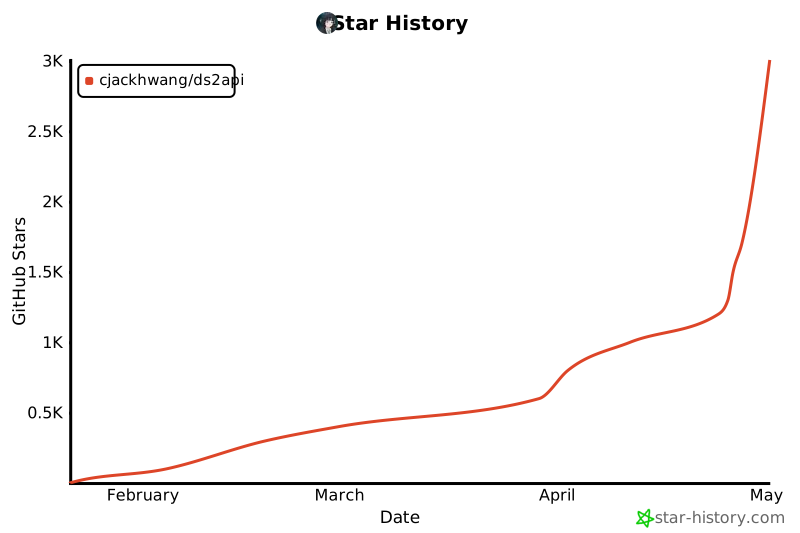](https://star-history.com/#CJackHwang/ds2api&Date)
|